Perform Consumer API guide
 Jun 25, 2024
Perform Consumer Feed API guide(Betting)
Find scheduled fixtures, and get live sports data via our Consumer API and receive data over a WebSocket connection , so you can create your own data visualisations.
Overview
Here, we provide an overview of the live data feed API enabling subscribers to load sport, event and live data pertaining to available fixtures. This document is intended for a technical audience with JavaScript development skills.
Quick links
Access Restrictions
Access to the data feed and getToken call will be restricted by one of these two available methods: whitelisted IP addresses or referrer security.
- IP address - users wishing to restrict access by IP address should provide IP addresses or an IP range to Perform so that we can add these to our whitelist and configure your account.
- Referrer-based security (CORS) - users who do not want to provide a set of IP addresses to Perform can instead provide us with a list of domains to whitelist. In this case, it is not necessary to provide a list of servers.
Fixture Schedules in the Content Catalogue (/mcc) feed (replaces Event List XML)
To access the live data stream you will need to pass the unique fixture id/mccItem id. This ID can be found, along with other information about the event, in the Master Content Catalogue (/mcc) feed. The Content Catalogue feed will return fixtures scheduled up to 14 days in advance. As we frequently add fixtures, we recommended that you call it often, for example, every 30 minutes.
In earlier versions of our Consumer API integration guide, we recommend getting a list of forthcoming schedules from our Event List XML feed. However, for Watch & Bet 2.0 the Event List is superceded by Perform Feeds Master Content Catalogue (
/mcc) - this is also used by partners who have integrated with our live streams.We recommend using the Content Catalogue (MCC) to look up fixtures (events); it contains the essential information you need, such as the UUID for the fixture/match/event. You can see how the Event List XML and Content Catalogue compare in our Migration Guide.
This feed represents all fixtures that will be available in the visualisation. It returns this metadata as mccItems. Each mccItem in the response comprises fixture and asset elements, which contain the scheduled start date, fixture UUID and the linked contestants (such as teams), sport, and competition. You can also use this information to filter the fixture list further.
Example requests for live data and fixture schedules
The Content Catalogue feed is RESTful - you can access the feed via a URL and return data in XML, JSON, or JSONP. Make a GET request to the /mcc endpoint over HTTPS, in UTF-8 format.
You can get fixtures with a scheduled start date/time that is up to 14 days ahead of or before the date of your request. To do so, use the fx.nDy or fx.fDt query parameter. Only fixtures within the specific date range are returned. You can sort results by the start date/time. Data assets are locale-neutral and always returned. To filter the feed by criteria such as the Sport or Country, pass the UUID to the appropriate parameter: fx.sprt (Sport) | fx.ctst (Contestant)
Get fixtures and data assets scheduled for the same day and by Sport UUID or Contestant UUID:
In this example, the request returns only fixture and live data metadata for all Soccer fixtures scheduled for the date of the request. The Sport UUID for Soccer is 289u5typ3vp4ifwh5thalohmq.
It is sorted according to fixture date and time (_ord=fx.fDt), in ascending order (_ordSrt=asc). Therefore, items at the top of the feed are fixtures with the earliest start times that day. For example, fixtures scheduled to start at 10:00 (UTC) will be higher up than those starting at 11:00.
GET https://wab.performfeeds.com/mcc/{outletAuthKey}/?_rt=b&_fmt=json&_fldGrp=mcc.a,mcc.b&fx.sprt=289u5typ3vp4ifwh5thalohmq&_ord=fx.fDt&_ordSrt=asc
Get fixtures - by number of days (fx.nDy):
To specify a date range by the number of days ahead of/before the request date, pass an integer in [<-14,14>] to the fx.nDy parameter (0 is invalid). Example: fx.nDy=-1 returns fixtures from the current and previous day, and fx.nDy=1 returns those for the current day. Here, the request is for fixtures scheduled 14 days ahead of the current date.
GET https://wab.performfeeds.com/mcc/{outletAuthKey}/?_rt=b&_fmt=json&_fldGrp=mcc.a,mcc.b&fx.sprt=289u5typ3vp4ifwh5thalohmq&_ord=fx.fDt&_ordSrt=asc&fx.nDy=14
Get fixtures - by start date to end date (fx.fDt):
To get fixtures scheduled within an exact date/time range, use the fx.fDt parameter and specify two dates, or to/from any date (*) to another (in XSD or milliseconds since the epoch). Here, the request is for fixtures between 08 December 2016 and 20 December 2016.
GET https://wab.performfeeds.com/mcc/{outletAuthKey}/?_rt=b&_fmt=json&_fldGrp=mcc.a,mcc.b&fx.sprt=289u5typ3vp4ifwh5thalohmq&_ord=fx.fDt&_ordSrt=asc&fx.fDt=[2016-12-08T00:00:00Z TO 2016-12-20T00:00:00Z]
0' as a value (fx.nDy=0); otherwise, you will receive an error because it does not specify a date/range. Do not use + as it is not a valid operator and will cause an error (10202). Example: fx.nDy=1 is valid, but fx.nDy=+1 is not.Content Catalogue feed - Request Parameters and Values (/mcc)
The example requests include the following elements, and required and key optional parameters.
Basic URL: https://wab.performfeeds.com/mcc/{outletAuthKey}/?{queryParameters}
| Element/URL Parameter | Description and accepted values |
|---|---|
https://wab.performfeeds.com/mcc | Required. Protocol, base domain and MCC endpoint (/mcc) to access fixture and livestream asset metadata in the Content Catalogue. We only support https. |
{outletAuthKey} | Required. Outlet Authentication Key. An alphanumeric UUID supplied to each outlet by Perform. Requests made without a valid key will be rejected. |
{queryParameters} | Required. Query parameters. Query the feed and control the returned content, format and page size. You must specify all required parameters and valid values. |
_rt={mode} | Required. Operating mode / request type (query parameter). Value: b (B2B). If omitted, the default feed behaviour is B2C mode and you may receive an error. |
_fmt={dataFormat} | Recommended. Data format (query parameter). Values: xml | json | jsonp (requires _clbk query parameter). If you do not specify _fmt, it is XML (default). |
_fldGrp={fieldGroupMask} | Required. Field group/mask (query parameter). Values: see the example requests and _fldGrp. Returns metadata associated with the {fieldGroupMask} specifier value, including details of fixtures (such as ID, date/time, sport and competition) and assets (such as type, livestream or fastdata, and ID). Example values:• mcc.a - returns all key fields including Allowed Country Codes (attribute allowedCountryCodes)• mcc.b - returns all key fields including Blocked Country Codes (attribute blockedCountryCodes)• fx.idnt.{supplierName} - returns identifier metadata (holds supplierName and own fixture id)Example: fx.idnt.RB = RunningBall. If a fixture is not linked to the specified supplier, it is returned without identifier metadata. You cannot use the ID to get a livestream or data; it is supplied to help partners who have already mapped to the supplier to integrate their systems. |
_ord={fieldMask} | Optional. Ordering (query parameter) - the data field to use as the criteria by which to order the feed. Values: abbreviation of a field mask, such as fx.fDt (fixture date and time). |
_ordSrt={sortOrder} | Optional. Sort order (query parameter) of the feed. It is only valid when passed with the _ord parameter and a field value in a request. Values: asc (ascending) or desc (descending). |
fx.fDt=[{date TO date}] | Optional. Fixture date and time range (query parameter). Value: in XSD (YYYY-MM-DDTHH:MM:SSZ) or milliseconds (since the epoch). Examples: • [xsd:dateTime TO xsd:dateTime] or [xsd:dateTime TO *] or [* TO xsd:dateTime]• [milliseconds TO milliseconds] or [milliseconds TO *] or [* TO milliseconds] |
fx.nDy={numberDays} | Optional. Fixture date range - by day (query parameter) - number of days ahead of/before the request date. Value: integer in the range [<-14,14>] (0 is invalid). Examples (using a current date of 2017-02-13):• fx.nDy=1 (same day). Equivalent: fx.fDt=[2017-02-13T00:00:00Z TO 2017-02-13T23:59:59Z]• =2 (today to tomorrow). Equivalent: fx.fDt=[2017-02-13T00:00:00Z TO 2017-02-14T23:59:59Z]• =-1 (today to yesterday). Equivalent: fx.fDt=[2017-02-12T00:00:00Z TO 2017-02-13T23:59:59Z] |
fx.sprt | Optional. Sport (filter Fixtures by Sport UUID). Value: Sport UUID. See the Sport UUID table. |
If you do not pass any query parameters in the request URL, you may receive an error or limited data from the response. While some query parameters are optional, you should always specify the following query parameters (and valid values) to ensure that your requests are successful and return fixture and asset metadata, of the asset language(s) and in the response format, which you require:
_rt, _fmt, _fldGrp, as.langExample request response
Here, the response is for fixtures scheduled for the same day. On success, the HTTP status code in the response header is 200 (OK). The body contains mccItems (fixtures and assets) scheduled for the current day, sorted by fixture date and time, and ascending order - instead of default sorting (descending, by asset lastUpdateTime). This means that fixtures at the top of the feed are those scheduled to start earlier in the day. On error, the body contains an error code.
For JSONP, successful and failed requests return status code 200. If you receive an error, see Error codes.
For this mccItem, "Nice v Reims", the fixture metadata includes its date, time and unique fixture ID (54csvtpw8hip1eiv65bp4uuy9). The asset element confirms the fixture is covered by data (asset type).
Example response (JSON):
{
   "mccItem": [
      {
         "name": "Nice v Reims",
         "type": "urn:perform:mfl:fixture",
         "fixture": {
            "id": "54csvtpw8hip1eiv65bp4uuy9",
            "date": "2016-04-22",
            "time": "19:00:00",
            "sport": {
               "id": "289u5typ3vp4ifwh5thalohmq",
               "value": "Soccer"
            },
            "competition": {
               "id": "dm5ka0os1e3dxcp3vh05kmp33",
               "code": "FRA",
               "value": "Ligue 1"
            },
            "contestant": [
               {
                  "id": "3c3jcs7vc1t6vz5lev162jyv7",
                  "value": "Reims"
               },
               {
                  "id": "bx0cdmzr2gwr70ez72dorx82p",
                  "value": "Nice"
               }
            ]
         },
         "asset": [
            {
               "id": "1kc73cm2uhwjw12fp59ark7lo9",
               "name": "Nice v Reims",
               "type": "urn:perform:livestream",
               "urn": "urn:perform:livestream:1kc73cm2uhwjw12fp59ark7lo9",
               "lastUpdateTime": "2016-04-11T13:25:06Z",
               "allowedCountryCodes": "AE AF AG AI AL AM"
            },
            {
               "id": "ej9cnyc2lmczfeshz1np86ynd",
               "type": "urn:perform:fastdata",
               "urn": "urn:perform:fastdata:ej9cnyc2lmczfeshz1np86ynd",
               "lastUpdateTime": "2015-04-13T12:30:27Z"
            }
         ]
      }
   ]
}
Example response (XML):
<mcc xmlns="http://www.performgroup.com/ns/pf/mcc/get">
   <mccItem id="54csvtpw8hip1eiv65bp4uuy9" name="Nice v Reims" type="urn:perform:mfl:fixture">
      <fixture id="54csvtpw8hip1eiv65bp4uuy9" date="2016-04-22" time="19:00:00">
         <sport id="289u5typ3vp4ifwh5thalohmq">Soccer</sport>
         <competition id="dm5ka0os1e3dxcp3vh05kmp33" code="FRA">Ligue 1</competition>
         <contestants>
            <contestant id="3c3jcs7vc1t6vz5lev162jyv7">Reims</contestant>
            <contestant id="bx0cdmzr2gwr70ez72dorx82p">Nice</contestant>
         </contestants>
      </fixture>
      <assets>
         <asset id="1kc73cm2uhwjw12fp59ark7lo9" name="Nice v Reims" type="urn:perform:livestream" urn="urn:perform:livestream:1kc73cm2uhwjw12fp59ark7lo9" lastUpdateTime="2016-04-11T13:25:06Z" allowedCountryCodes="AE AF AG AI AL AM"/>
         <asset id="ej9cnyc2lmczfeshz1np86ynd" type="urn:perform:fastdata" urn="urn:perform:fastdata:ej9cnyc2lmczfeshz1np86ynd" lastUpdateTime="2015-04-13T12:30:27Z"/>
      </assets>
   </mccItem>
</mcc>
Content Catalogue feed - Response field attributes and values (/mcc)
The response contains the following fields when mcc.a or mcc.b is passed to the _fldGrp query parameter in the request URL.
The MCC schema can be found at: http://wab.performfeeds.com/schema/mcc/xsd/1.0/catalogue-get.xsd
| Element/Attribute | Description |
|---|---|
<mccItem> | parent element containing all fixture and asset metadata about the single fixture attributes: "name", "type", "id"elements: <fixture> and <assets> |
... name | attribute: name of the fixture (sometimes its contestants are also named here) |
... type | attribute: item type - always a fixture (urn:perform:mfl:fixture) |
... id | attribute: unique ID of the item - the value is the same as the fixture id in the fixture element |
<fixture> | element: contains all fixture metadata attributes: "id", "date", "time"sub-elements: <sport>, <competition>, <contestants> |
... id | attribute: unique ID of the fixture - matches the mccItem id. Also known as the MFL Fixture UUID |
... date | attribute: scheduled fixture start date (UTC format) |
... time | attribute: scheduled fixture start time (UTC format) |
... <sport> | sub-element: contains the ID and name of the Sport |
...... id | attribute: unique ID of the Sport |
...... (value) | string value: name of the Sport |
... <competition> | sub-element: contains id (UUID), name and country attributes for the Competition |
...... id | attribute: unique ID of the Competition |
...... code | attribute: country code of the Competition (for example: US for USA and ESP for Spain) |
...... (value) | string value: name of the Competition (for example: Tercera Division) |
... <contestants> | sub-element contains <contestant> sub-elements for each Contestant in the fixture |
...... <contestant> | sub-element: contains id attribute and name value of a Contestant in the fixture |
......... id | attribute: unique ID of the Contestant (the same ID represents the Contestant across Perform Feeds) |
......... (value) | string value: name of the Contestant (for example, San Fernando CD) |
<assets> | attribute: contains <asset> sub-elements and metadata for each asset linked to the fixture |
... <asset> | sub-element: contains attributes for id, name, type, urn, lastUpdateTime. For the "livestream" type, it will contain attributes for allowedCountryCodes and blockedCountryCodes |
......... id | attribute: unique ID of the asset, such as live data or a livestream. |
......... (value) | string value: name describing the asset |
......... type | attribute: the type of asset, either urn:perform:livestream (livestream) or urn:perform:fastdata (data). To authorise a user to access a livestream in the OAuth API, specify the asset type in the scope: scope=livestream |
......... urn | attribute: URN of asset. A concatenation of the "type" and "id" values from the asset element it belongs to. Example: urn:perform:livestream:1kc73cm2uhwjw12fp59ark7lo9 |
......... lastUpdateTime | attribute: the last update time of the asset, in international date format (YYYY-MM-DDTHH:MM:SSZ) |
......... allowedCountryCodes | attribute: countries in which the livestream asset is available, as space-separated codes (for example: AU GB US). It is only returned if mcc.a is passed to _fldGrp in the request |
......... blockedCountryCodes | attribute: countries in which the livestream asset is not available, as space-separated codes (for example: AU GB US). It is only returned if mcc.b is passed to _fldGrp in the request |
Content Catalogue feed - Error codes and explanations
| Perform error code | HTTP code | Explanation |
|---|---|---|
| n/a | 200 | Successful request. No error. |
10000 | 500 | An unexpected error has occurred. Verify that the URL, Outlet Authentication Key, query parameters and format are correct, and then try again. We supply your Outlet Authorisation Key to you when we setup your account. Contact us if you continue to receive the error. |
10001 | 404 | Page not found. You may have requested a page that does not exist. Only mccItems with a fixture start date that is within a range of 14 days ahead of or before the current date will be returned. |
10010 | 404 | Outlet does not exist. Incorrect or missing Outlet Authentication Key or mandatory character (? or _).• Make sure you have specified the correct Outlet Authentication Key. A unique key is supplied to each outlet when we first confirm your account is active. Contact us if the error continues. • Check for incorrect or missing characters. A ? must be specified before the first query parameter in the URL: ?{queryParameters}. The _ (underscore) prefix is mandatory for some query parameters, such as _rt and _fmt.Make sure you have structured request URLs correctly. Example: {protocol}://{domain}/{resource}/{outletAuthKey}?{queryParameters}Note: {protocol}://{domain} represents: https://wab.performfeeds.com |
10100 | 500 | Feed Unavailable. The service is not available at this time. Wait a short time, and then try again. If the error persists, contact Perform. |
10101 | 500 | Feed Unavailable. The service is not available at this time. Wait a short time, and then try again. If the error persists, contact Perform. |
10102 | 503 | Feed Unavailable. Temporary error - wait a short time and then try again. If the error persists, contact Perform. |
10200 | 400 | Missing request parameter. A mandatory parameter has not been supplied. Ensure all mandatory parameters are supplied and correct. If you specify the format as JSONP, you must also specify the callback function in the URI or Accept Header: _fmt=jsonp&_clbk={callbackFunction} |
10201 | 562 | Unknown request parameter. A parameter has been supplied that does not exist in the /mcc feed. Check that the parameter and associated value exists for the feed, and that both are correct, and then try again. Note: The /mcc feed only supports requests in B2B mode (parameter-value of _rt=b. It does not support B2C mode. |
10202 | 400 | Invalid request parameter value. You have passed invalid values to a valid query parameter, or multiple values to a parameter that only supports one value per request. Check the values and try again. Possible reasons: • Invalid value. Example: ( 0) in fx.nDy=0 (invalid). Valid: Integer in [<-14,14>]• Missing character. Example: ( .) in _fldGrp=mcca (invalid). Valid: mcc.a• Extra character. Example: ( +) in fx.nDy=+1 (invalid). Valid: fx.nDy=1• Missing value. Example: If you specify the format as JSONP, you must also specify the callback function in the URI or Accept Header: _fmt=jsonp&_clbk={callbackFunction} |
10203 | 400 | Ambiguous/Invalid request parameters. The request is invalid for one or more of the following reasons: • You have specified a parameter more than once in a request. Remove the duplicate parameter and try again. • You have used a combination of query parameters in the same request which cannot be used together (they do not make sense). Example: Using both fx.nDy and fx.fDt together. |
10204 | 405 | Invalid request method. You are attempting to use POST with an endpoint that only accepts GET. Amend the method and try again. |
10210 | 415 | Unsupported format: _fmt parameter. Check the supplied format value is valid for the feed. If using the _fmt parameter in the URI check that a valid value has been specified. If a value has not been specified, then default format for the feed is used to determine the response body format. Note: Perform Feeds does not support the Accept header method. |
10212 | 400 | Unsupported mode: _rt parameter. The /mcc feed only supports requests in B2B mode (parameter-value of _rt=b. It does not support B2C mode (c). If a value is not supplied then B2C mode is used by default. |
10214 | 400 | Unknown field requested : _fld / _fldGrp parameter. The field mask specifier you have supplied to the _fld or _fldGrp is not recognised for this feed. Most Perform Feeds share a common set of format query parameters that generally, but not always, offer the same behaviour and functionality. Query parameters, values and behaviour can differ, so make sure that the field mask value you specified is correct for the feed you are attempting to call, as given in our guide. |
10216 | 400 | Invalid sorting: _ord, _ordSrt parameters. See _ord and _ordSrt for details.• _ord defines which field(s) are used to sort results; make sure you pass a valid value - this is the field mask's abbreviated name.• _ordSrt controls the sorting order of results in asc (ascending, default) or desc (descending) order, based on the field value passed to _ord; _ordSrt has no effect if _ord is not used. |
10217 | 400 | Invalid pagination: _pgNm, _pgSz parameters. The page number or page size is not available. Page size is controlled by the operating mode (see _rt parameter). Page number is determined by the page size and number of results available - try the request without these parameters to find out the number of results in the first page. Note: Specify a value of '1' or higher; '0' is not valid. See the _pgSz and _pgNm for details. |
10219 | 413 | Invalid size of parameter: _pgSz parameter. The specified page size exceeds the permitted maximum for the outlet. Page size is subject to a maximum of 1000 results per page (B2B requests). Otherwise, send the request without _pgNm or _pgSz. |
10300 | 403 | Feed Access Denied. Check that the feed is available within your subscription, and that you have specified the correct settings for the access URI, B2B mode referer type (_rt=b), and domains/IP addresses (for whitelisting). |
10310 | 401 | User not Authorised. You have not supplied a valid Outlet Authentication Key - your unique key is supplied to you when we first confirm your account is active. Make sure that a valid key is supplied in the HTTP request URI or in the Accept header. Contact us if you continue to receive this error or need to confirm your key. |
10311 | 401 | The length of the username field parameter exceeded. The username field parameter in the call to the Oauth feed cannot exceed 35 characters in length. |
10320 | 503 | Acceptable usage exceeded. Allow up to 30 minutes before sending further requests - if the error remains, contact Perform. |
10400 | 404 | No data found. Try again. If the error continues, it may be that no MCC items (fixtures and assets) match the combination of query parameters and values - attempt a call using different search criteria (try a simple call for testing purposes). |
10401 | 408 | Data request timeout. Request for specific data timed out. Try again. If the error continues, attempt a simple request to the feed (do not use many parameters and values). |
10402 | 503 | Data corrupt. Try again. If the error continues try a request for simple and different search criteria. |
10501 | 415 | Unsupported media format. Check the configuration. |
10502 | 412 | Missing character encoding. Declare the character encoding. Note: The API expects data to be UTF-8 encoded. |
10503 | 412 | Invalid feed enclosed in body. |
Live Data Feed
The live data feed is delivered via WebSockets. A connection is opened using a provided socket server URL and unique security token passed as a query string parameter.
Tokens are provided for a single socket connection and reuse will result in disconnection or data starvation for existing connections using the same token, the token must also be used within 30 seconds.
Before you start: You will need a unique Customer ID and Customer Key to call the feed. We will provide you with these credentials - they are different to the Outlet Authorisation Key required for the /mcc feed. Requests will only be accepted from the whitelisted IP addresses supplied to Perform.
Get a token:
To obtain a token users must make a request to:
http://wab-visualisation.performgroup.com/getToken
Example getToken request (IP whitelisting):
http://wab-visualisation.performgroup.com/getToken?api=true&customerId=testcustomerid&customerKey=testCustomerKey&userId=testuniqueuserid&uuid=5vd97wfczhqit0si8s1j3psb0
Example getToken request (CORS):
If the CORS security method is in use (referrer-based security), the customerId and customerKey parameter-value pairs are not passed. In this case, an example call follows the following format.
http://wab-visualisation.performgroup.com/getToken?api=true&userId=testuniqueuserid&uuid=5vd97wfczhqit0si8s1j3psb0
getToken feed - Request Parameters and Values
| Query parameter | Description and accepted values |
|---|---|
api | Required. API. Value: Must be set to true |
customerId={yourCustomerId} | Required - IP whitelisting method only. Customer ID. Value: Replace {yourCustomerId} with your unique ID, which we supply to you when we confirm your Consumer API setup details. Requests made without a valid ID will be rejected. |
customerKey={yourCustomerKey} | Required - IP whitelisting method only. Customer Key. Value: Replace {yourCustomerKey} with your key, which is unique to you - we supply it to you when we setup your account. Requests made without a valid key will be rejected. |
uuid={fixtureUuid} | Required. Match/Fixture UUID. Value: The UUID of the fixture/match which needs to be loaded. It is returned in the response when your application makes a successful request to our API for a schedule of fixtures/events.
|
userId={userId} | Optional. User ID. Value: Replace {userId} with a value to help identify usage for tracking purposes. If end user is not required to log on then we suggest the value is, for example, the application name, portal name, or website address, or any any unique string which will allow us to track the progress of the user throughout the session and identify the request. |
Example response - success:
If a successful call is made to the /getToken API, the response contains a token. The example below is for JSON.
{
  "token":"81b35dc55c83a02d1957e7d9fda30f6c2b4db27b6b",
  "socketServerUrl":"socketserverurl.performgroup.com"
}
Example response - error:
If an unsuccessful call is made to the /getToken API, then the following response may be returned as the value of the error property.
{"error":"103"}
getToken feed - Error codes and explanations
| Error code | Explanation |
|---|---|
101 | A token has not been authorised. This is the default error response from the /getToken feed. |
102 | No socket server is available to assign to a token, thus a token cannot be generated. Contact Perform. |
103 | The fixture/match UUID sent in the token request could not be matched to an existing ID in the fixture schedule. |
104 | Either a parameter or value for customerId, customerKey, userid, or sportid has not been supplied or cannot be derived from the request origin. |
105 | An error occurred generating the token. Contact Perform. |
HTTP 403 | Contact Perform to ensure that the correct whitelisting method is enabled. |
Using the token in a WebSocket connection
Once a valid token has been obtained this can be used to connect to the provided socket server.
This example HTML contains the /getToken call and JavaScript code required for connecting to a socket server via a WebSocket.
<html>
  <head>
    <script src="http://wab-visualisation.performgroup.com/socket.io/socket.io.js"></script>
    <script src="//ajax.googleapis.com/ajax/libs/jquery/1.8.3/jquery.min.js"></script>
    <script  type="text/javascript">
      function connectToDataFeed(args) {
          console.log("in");
          var url = "http://wab-visualisation.performgroup.com/getToken?&api=true&userId=k4fr3h34u34&uuid=d53gggs6eg3j4";
          console.log(url);
          $.ajax({
              type: "GET",
              url: url,
              success: function (data) {
                  try {
                      var tokenContainer = JSON.parse(data);
                      if (tokenContainer.error) {
                          console.log(tokenContainer.error);
                      }
                      else {
                          var socketConnectionUrl = 'http://' +
                              tokenContainer.socketServerUrl +
                              '?token=' + tokenContainer.token;
                          console.log(socketConnectionUrl);
                          var apiSocket = io.connect(socketConnectionUrl, {
                              'reconnect': true,
                              'reconnection delay': 5000,
                              'max reconnection attempts': 100,
                              'force new connection': true
                          });

                          apiSocket.on('message', function (data) {
                              console.log(data);
                          });

                          apiSocket.on('error', function () {
                              console.log("Error in socket");
                          });
                      }
                  }
                  catch (err) {
                      console.log(err.message);
                  }
              }
          });
      }
      function enterFixtureId() {
          var customerId = prompt("Please enter customer id", "")
          var customerKey = prompt("Please enter customer key", "")
          var provider = prompt("Please enter provider[uuid]", "")
          var fixtureId = prompt("Please enter fixtureId:", "");
          var args = {};
          args[provider] = fixtureId;
          args.customerId = customerId;
          args.customerKey = customerKey;
          connectToDataFeed(args);
      }

    </script>
  </head>
  <body onload="enterFixtureId()">
  </body>
</html>
On Connect Responses
Here, you can find find the possible responses to the WebSocket connection request.
| On Connect Response | Description |
|---|---|
SubscribeReceipt | This is a message sent when a successful connection is made at the data server, the data object defines the system ID of the fixture and the channel subscribed to.
{SubscribeReceipt : 1234567, Message: "Subscribe request received for 1234567", data : {Topic : 1234567, LiveUpdates : 'true'}}
|
TokenTransferred | This is a notification that the token assigned to this connection has been reused by another connection. In this instance no further updates will be sent via this connection.
{TokenTransferred : <<TOKEN>>, Message: "Token transferred to another connection"}
If this error is received, check that a unique token is generated for each connection, otherwise the original connection will be “evicted” when you attempt to reuse the token
|
Advisory |
{ Advisory : true, Message : "Message Broker is offline." }
This will indicate that the message broker is currently offline, if the connection remains open and the message broker comes back online live data updates will be received. |
SYSM |
{"SYSM":{"D":"\/Date(1376935507114+0100)\/","ID":330453,"M":"Game cancelled. Unfortunately we cannot offer this game anymore.","MID":401}}
If a match that is requested has been cancelled a system message will be received. |
MLU messages
The JSON message container for all messages sent via the API is the MLU (Match Live Update), the first message received will contain data relating to the current status of the event including lineups, head2head data, historical data and team kit: these data objects are defined in the following table.
Here, we provide a sample MLU JSON object received from the WebSocket.
"ID" refers to the system ID of the current fixture.{
"MLU": {
"ID": 364274,
"HT": "Lokomotivi Tbilisi",
"AT": "Dila II",
"EN": "439",
"CPT": 2858737,
"CR": "true",
"SCH": "0",
"SCA": "2",
"EID": 2049,
"TSID": 8,
"PSID": "3",
"L": "Pirveli Liga",
"SN": "Soccer",
"SI": 1,
"STA": "Saguramoas sapekhburto kompleksi",
"WBID": "0",
"ST": {},
"T": [],
"TK": [],
"FORM": {},
"H2H": {},
"TD": {},
"LU": {},
}
}
Here is a sample of a MLU message with all elements displayed. To save space, when a property value is an array we've only included the first element.
[]indicates an array object{}indicatesa JavaScript object
{
    "MLU": {
        "ID": 366597,
        "UUID": "0",
        "WBID": "0",
        "HT": "Alashkert II",
        "AT": "Ararat II",
        "EN": "791",
        "CPT": 5249534,
        "CR": "true",
        "SCH": "2",
        "SCA": "1",
        "EID": 262,
        "Z": "FK3R",
        "RE": "790",
        "TSID": 8,
        "PSID": "3",
        "L": "First League",
        "SN": "Soccer",
        "SI": 1,
        "STA": "Kasakhi Marzik",
        "ST": {
            "AT": "25:30",
            "CR": "1:0",
            "DAT": "21:10",
            "F": "6:8",
            "FK": "9:11",
            "SB": "3:0",
            "SH": "5:1",
            "SHG": "2:1",
            "SHT": "1:1"
        },
        "T": [
            {
                "CP": 135305,
                "EID": 1026,
                "EN": "30",
                "I": "1",
                "M": 3,
                "P": "1"
            },
            {
                "CP": 143547,
                "EID": 2066,
                "EN": "32",
                "I": "1",
                "M": 3,
                "P": "1"
            }
        ],
        "TK": [
            {
                "C1": "ff0000ff",
                "C2": "ff0000ff",
                "D": "0",
                "IHT": true,
                "P": "ff0000ff",
                "S": "ffffffff"
            },
            {
                "C1": "ffff0000",
                "C2": "ffff0000",
                "D": "0",
                "P": "ff000000",
                "S": "ff000000"
            }
        ],
        "H2H": {
            "HST": [
                {
                    "ID": 1522063,
                    "DT": "2013-09-07",
                    "TM": "13:00:00",
                    "H": 4,
                    "A": 0,
                    "T": "A"
                }
            ],
            "MS": [
                {
                    "CNT": 1,
                    "HT": {
                        "W": 1,
                        "L": 0,
                        "D": 0,
                        "G": 4
                    },
                    "AT": {
                        "W": 0,
                        "L": 1,
                        "D": 0,
                        "G": 0
                    }
                }
            ]
        },
        "FORM": {
            "HS": {
                "AL": {
                    "AS": 1.6428571428571428,
                    "AC": 1.2857142857142858,
                    "FS": 0,
                    "CR": 0,
                    "LH": 0,
                    "LF": 0
                },
                "HO": {
                    "AS": 2.2857142857142856,
                    "AC": 1,
                    "FS": 0,
                    "CR": 0,
                    "LH": 0,
                    "LF": 0
                },
                "AW": {
                    "AS": 1,
                    "AC": 1.5714285714285714,
                    "FS": 0,
                    "CR": 0,
                    "LH": 0,
                    "LF": 0
                }
            },
            "AS": {
                "AL": {
                    "AS": 2.3,
                    "AC": 1.8,
                    "FS": 0,
                    "CR": 0,
                    "LH": 0,
                    "LF": 0
                },
                "HO": {
                    "AS": 2.4,
                    "AC": 1.5,
                    "FS": 0,
                    "CR": 0,
                    "LH": 0,
                    "LF": 0
                },
                "AW": {
                    "AS": 2.2,
                    "AC": 2.1,
                    "FS": 0,
                    "CR": 0,
                    "LH": 0,
                    "LF": 0
                }
            },
            "HM": [
                {
                    "ID": 1522094,
                    "DT": "2013-11-04",
                    "H": 2,
                    "A": 1,
                    "T": "A",
                    "LN": "First League",
                    "TN": "Banants II"
                }
            ],
            "AM": [
                {
                    "ID": 1522093,
                    "DT": "2013-11-04",
                    "H": 0,
                    "A": 0,
                    "T": "H",
                    "LN": "First League",
                    "TN": "Mika II"
                }
            ]
        }
    }
}
The following table details all possible properties of the MatchLiveUpdate (MLU) object and describes their meaning.
| MLU JSON Property Name | Description | |||
|---|---|---|---|---|
ID | The ID used by the data feed | |||
WBID | The Watch and Bet ID | |||
UUID | The ID, as taken from the Master Fixture List (returned in the Content Catalogue /mcc schedule feed and Event List feed). | |||
KO | Kick-Off time in UTC format. Example: "/Date(1383919200000+0000)/" | |||
HT | Home Team name | |||
HTLA | Home Team three-letter abbreviation | |||
AT | Away Team name | |||
ATLA | Away Team three-letter abbreviation | |||
EN | Event Number – it increases incrementally with each message sent via the data service | |||
CPT | Current playtime of the game in milliseconds – the values correlate with minute | |||
CR | clockRunning is important for sports where the clock is interrupted permanently (basketball), but may also change if a game is in a paused stateSet to "true" when the game clock is running and game time (currentPlaytime) is counting up or down | |||
SCH | Score Home - see property "H" for team name | |||
SCA | Score Away - see property "A" for team name | |||
EID | Event Code ID. See the Event Code IDs section for the respective sport | |||
PI | Player-In substitution | |||
PO | Player-Out substitution | |||
JI | Jersey-In substitution | |||
JO | Jersey-Out substitution | |||
Z | The sport-specific Zone code describing the area of the field where the event has taken place. See section: Zone Information | |||
RE | Related Events – used when events are cancelled or to provide follow-up event and player information for events, including free kicks, goals and corner events | |||
STA | The stadium/venue for the fixture | |||
SI | The Sport ID (sportid) for the fixture | |||
SN | The sport name for the fixture | |||
TSID | The current state the game is in. For example, "first half" when a soccer game is in the first 45 minutes of its regular playtime. See section: Ticker State IDs | |||
PSID | The play state ID. See section: Play State IDs | |||
L | The League/Competition for the fixture | |||
PID | Player ID for the related event | |||
PN | Player name for the related event | |||
JN | Jersey Number for the related event | |||
NBA (Basketball) | Indicates that the game is played under NBA rules (Basketball) | |||
IPF | Indicates that In-Play Facts are available for this game and to your outlet. In-Play Facts is an add-on and is not available to everyone by default. Contact Perform for more information. | |||
ST{}(Soccer) | Statistics - MLU property containing statistics for the current fixture (see the next section). Values: Home|Away | |||
O | Offside | |||
SH | Shots | |||
F | Fouls | |||
SHW | Shots Woodwork | |||
FK | Free Kicks | |||
BA | Break Aways | |||
DAT | Dangerous Attacks | |||
AT | Attacks | |||
YC | Yellow Cards | |||
RC | Red Cards | |||
SHG | ShotsOnTarget | |||
SHB | ShotsOffTarget | |||
SUB | Substitutions | |||
CR | Corners | |||
SB | Shots Blocked | |||
GK | Goal kicks | |||
P | Penalties | |||
SHT | Score at Half Time | |||
SFT | Score at Full Time | |||
SETHT | Score at Half Time in Extra Time | |||
SETFT | Score at Full Time in Extra Time | |||
SPSFT | Score after penalty shootout | |||
ST{}(Basketball) | Statistics - MLU property containing statistics for the current fixture (see the next section). Values: Home|Away | |||
TI | Technical Foul | |||
PB | Player Back | |||
PI | Player Injured | |||
PF | Personal Foul | |||
DQP | Disqualified Player | |||
P1 | Single Points Scored | |||
P2 | Double points scored | |||
P3 | Triple points scored | |||
FT1 | Single free throws awarded | |||
FT2 | Double Free throws awarded | |||
FT3 | Triple free throws awarded | |||
MFT | Missed free throws | |||
F | Fouls | |||
FO | Fouled Outs | |||
TO | Timeouts | |||
B | Balls | |||
SQ1 | Score 1st Quarter | |||
SHT | Score 2nd Quarter | |||
SQ3 | Score 3rd Quarter | |||
SFT | Score Full time | |||
ST{}(Ice Hockey) | Statistics - MLU property containing statistics for the current fixture (see the next section). Values: Home|Away | |||
TI | Technical Foul | |||
PS | Penalty Shots | |||
SH | Shots | |||
FW | Faceoffs Won | |||
OS | Offsides | |||
IC | Icings | |||
TO | Timeouts | |||
PR | Penalty Runnings | |||
AT | Attacks | |||
SP1 | Score 1st Period | |||
SP2 | Score 2nd Period | |||
SP3 | Score 3rd Period | |||
ST{}(Volleyball) | Statistics - MLU property containing statistics for the current fixture (see the next section). Values: Home|Away | |||
AE | Aces | |||
BK | Blocks | |||
ER | Errors | |||
KL | Kills | |||
OT | Outs | |||
PT | Points | |||
PP | Penalty points | |||
PY | Penalties | |||
EX | Expulsions | |||
DN | Disqualifications | |||
SE | Service Errors | |||
SS1 | Score after set 1 | |||
SS2 | Score after set 2 | |||
SS3 | Score after set 3 | |||
SS4 | Score after set 4 | |||
SS5 | Score after set 5 | |||
SGS | Score after golden set | |||
ST | Sets | |||
TT | Timeouts | |||
T{} | Timeline - MLU property containing the Timeline of events that occurred prior to the connection for the current fixture (see the next section) | |||
EID | Event Code ID | |||
EN | Event Number | |||
M | Minute | |||
CP | Current Playtime | |||
I | Instance of this event type | |||
SL | Scoreline when this event occurred | |||
PN | Player Name | |||
JN | Jersey Number | |||
PI | Player In | |||
PO | Player Out | |||
JI | Jersey In | |||
JO | Jersey Out | |||
TK[] | Team Kits - MLU property containing an array of Team Kits for the current fixture (see the next section) | |||
{} | MLU.TK array element | |||
TID | Team ID | |||
IHT | Is Home Team (Boolean) – set to true if sent for home team | |||
D | Design pattern of the jersey:0 = plain1 = striped horizontal2 = striped vertical3 = bar horizontal4 = bar vertical | |||
C1 | Colour 1, 4-byte color value Bytenumber: 4 : Alpha3 : Red2 : Green1 : Blue | |||
C2 | Colour 2, 4-byte color value Bytenumber: 4 : Alpha3 : Red2 : Green1 : Blue | |||
S | Socks, 4-byte color value Bytenumber: 4 : Alpha3 : Red2 : Green1 : Blue | |||
P | Pants, 4-byte color value Bytenumber: 4 : Alpha3 : Red2 : Green1 : Blue | |||
FORM{} | Form (Historical Statistics data) - MLU property containing historical form data for the current fixture (see the next section) | |||
HS{}AS{} | FORM propertyHS = Home Statistics Average | AS = Away Statistics Average | |||
AL{}HO{}AW{} | MLU.FORM.HS | MLU.FORM.AS propertyAL = Overall | HO = Home | AW = Away | |||
| All Sports | AS | Average Goals Scored | ||
| All Sports | AC | Goals Conceded | ||
| Soccer | FS | Average First to Score | ||
| Soccer | CR | Average Corners | ||
| Soccer | LH | Average Leading at Half Time | ||
| Soccer | LF | Average Leading at Half Time and Full Time | ||
| Basketball | FT | Average Free Throws | ||
| Ice Hockey | SR | Saves Rate | ||
| Ice Hockey | FTG | First Three Goals rate | ||
| Volleyball | WFS | Leading all sets | ||
HM[]AM[] | Form (Historical Match data) MLU.FORM.HS property containing an array of historical match data:HM = Home Matches | AM = Away Matches | |||
{} | Content of MLU.FORM.HM | MLU.FORM.AM array | |||
ID | GSM match ID | |||
DT | Game Start | |||
A | Away Score | |||
H | Home Score | |||
T | Game type (Home/Away) | |||
LN | League/Competition Name | |||
TN | Team/Competitor Name | |||
H2H{} | Form (Head-to-Head data) - MLU property containing historical data on fixtures between the current teams for the current fixture | |||
HST[] | MLU.H2H property containing an array historical half time scores between the two teams | |||
{} | Content of MLU.H2H.HST array | |||
ID | System fixture ID | |||
DT | Date of the fixture | |||
TM | Kick-off time of the fixture (UTC) | |||
H | Home score | |||
A | Away score | |||
T | H = Current Home team was at homeA = Current Away team was at home | |||
MS{} | MLU.H2H property | |||
CNT | MLU.H2H.MS property | |||
HT{}AT{} | MLU.H2H.MS property containing statistics for the head-to-head:HT = Home team | AT = Away team | |||
W | Games won | |||
L | Games lost | |||
D | Games drawn | |||
G | Games scored | |||
TD{} | Team data - MLU property containing team data for the current fixture | |||
| Soccer / Ice Hockey | HG[]AG[] | Goals - MLU.TD property containing an array of objects relating to the goals scored by the Home/Away team | ||
{} | Content of MLU.TD.HG | MLU.TD.AG array | |||
PL | Player name | |||
G | Games scored | |||
GPG | Average goals per game | |||
| Soccer / Ice Hockey | HA[]AA[] | Assists - MLU.TD property containing an array of objects relating to the goals scored by the Home/Away team | ||
{} | Content of MLU.TD.HV | MLU.TD.AV array | |||
PL | Player name | |||
A | Assists | |||
APG | Average assists per game | |||
| Soccer / Basketball | HV[]AV[] | Win Rate - MLU.TD property containing an array of objects relating to most valuable player on the Home/Away team | ||
{} | Content of MLU.TD.HV | MLU.TD.AV array | |||
PL | Player name | |||
PO | Position | |||
WR | The win rate for the team when this player was playing | |||
| Basketball | HP[]AP[] | Points - MLU.TD property containing an array of objects relating to points scored by the Home/Away team | ||
{} | Content of MLU.TD.HP | MLU.TD.AP array | |||
PL | Player name | |||
P | Points | |||
PPG | Points rate | |||
| Basketball | HF[]AF[] | Free Throws - MLU.TD property containing an array of objects relating to free throws by the Home/Away team | ||
{} | Content of MLU.TD.HF | MLU.TD.AF array | |||
PL | Player name | |||
F | Free throws | |||
FT | Free throw Tries | |||
FR | Free throw Rate | |||
| Volleyball | HA[]AA[] | Aces - MLU.TD property containing an array of objects relating to aces by the Home/Away team | ||
{} | Content of MLU.TD.HA | MLU.TD.AA array | |||
PL | Player name | |||
A | Aces | |||
APG | Aces rate per game | |||
| Volleyball | HK[]AK[] | Kills - MLU.TD property containing an array of objects relating to kills by the Home/Away team | ||
{} | Content of MLU.TD.HK | MLU.TD.AK array | |||
PL | Player name | |||
K | Kills | |||
KPG | Kills rate per game | |||
LU{} | Line-Ups MLU.TD property containing Line-Up (LU) data for the current fixture | |||
HLU[]ALU[]HSUB[]ASUB[] | HLU = Home team line-upALU = Away team line-upHSUB = Home team Subs line-upASUB = Away team subs line-up | |||
{} | Content of MLU.LU.*LU array | |||
X | X-coordinate - see Line-up message X/Y coordinates | |||
Y | Y-coordinate - see Line-up message X/Y coordinates | |||
PL | Player name | |||
PN | Player number | |||
PO | Player position | |||
RF[] | ||||
{} | ||||
RF | The referee's name/official's name | |||
TP | The official's role type. Values include:MN = main | AT = assistant | FO = Fourth Official | |||
Line-up message X/Y coordinates
| Attribute | Value and description |
|---|---|
| "X" coordinate output | |
GK | Goalkeeper |
D1 | Base defensive line |
D2 | Between the D1 and the DM |
DM | Defensive midfield line |
AM | Attacking midfield line |
A | Attacking line |
M | Base midfield line |
| "Y" coordinate output | |
CL | Centre left |
C | Centre |
CR | Centre right |
R | Right |
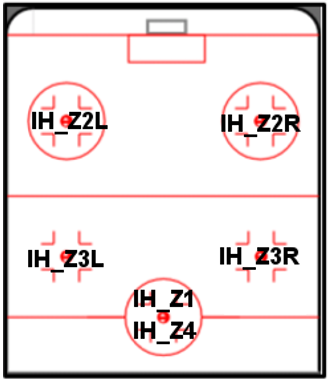
Zone Information - Soccer and Ice Hockey
A sport-specfic zone code describes the area of the field where the event has taken place for all sports that have zone, such as Soccer or Ice Hockey. Zones exist in both halves of the field, so the direction is determined by the teamId, such as the team taking the free kick is attacking at this end.
The figure below shows zone information for Soccer, with the codes used in Z property of the MLU.
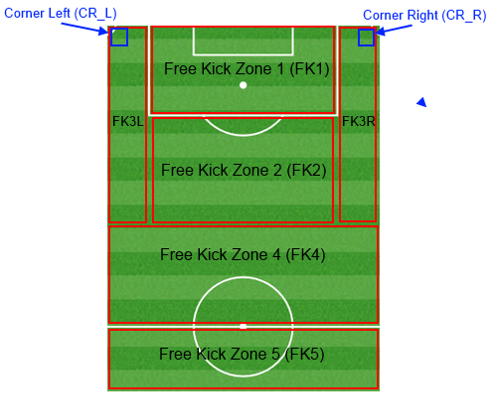
Zone ID Descriptions - Soccer
| Zone ID | Description |
|---|---|
FK1 | A free kick in the penalty box |
FK2 | A mid-field free kick |
FK3L | A free kick in the left wing |
FK3R | A free kick in the right wing |
FK4 | A free kick inside the halfway line |
FK5 | A free kick behind the halfway line |
CR L | A corner to the left of the goal |
CR R | A corner to the right of the goal |
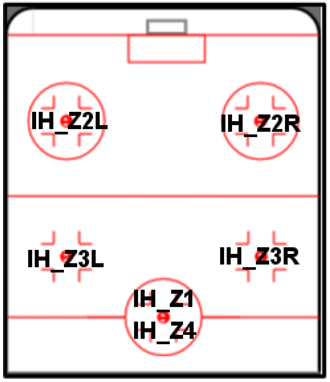
Zone ID Descriptions - Ice Hockey
| Zone ID | Description |
|---|---|
IH_Z1 | Bully Zone 1 |
IH_Z2L | Bully Zone 2 Left |
IH_ZR | Bully Zone 2 Right |
IH_Z3L | Bully Zone 3 Left |
IH_Z3R | Bully Zone 3 Right |
IH_Z4 | Bully Zone 4 |
Soccer Event Mapping Information
Soccer Event Code ID List
| Event Code ID | Description |
|---|---|
0 | Start first half |
1 | Stop first half |
2 | Start second half |
3 | Stop second half |
4 | Start first half extra time |
5 | Stop first half extra time |
6 | Start second half extra time |
8 | Start penalty shoot out |
9 | Stop penalty shoot out |
10 | Start first half, kickoff: Home |
11 | Start first half, kickoff: Away |
12 | Start second half, kickoff: Home |
13 | Start second half, kickoff: Away |
14 | Start first half extra time, kickoff: Home |
15 | Start first half extra time, kickoff: Away |
16 | Start second half extra time, kickoff: Home |
17 | Start second half extra time, kickoff: Away |
18 | Start penalty shoot out, first pen: Home |
19 | Start penalty shoot out, first pen: Away |
20 | Stop game |
129 | Danger |
132 | Injury break |
133 | Players are coming out |
134 | Player coming out |
135 | National anthem singing |
136 | Shake hands |
137 | Flip coin |
138 | Minute of silence |
139 | Prize giving ceremony |
140 | Photo taking |
141 | Game about to start |
142 | Penalty missed |
143 | Possible red card |
144 | Possible penalty |
145 | No red card |
146 | No penalty |
147 | Retake penalty |
148 | Restart game (after break in play, such as an injury) |
149 | Game suspended |
197 | Updating score (update started) |
198 | Score updated (update finished) |
207 | Possible free kick |
208 | No free kick |
209 | Referee ball |
256 | Cancel last sent |
257 | Clear events |
258 | Game conditions change |
260 | Extra time |
261 | Scorer |
262 | Zone information |
276 | Start game clock |
277 | Stop game clock |
278 | Adjust game clock |
279 | Scorer correct statistics |
280 | Period score confirmation |
283 | Substitution update |
285 | Player data confirmed |
513 | System message |
515 | Scout offline |
516 | Connection problems |
520 | Lineup changed |
524 | Jersey colours changed |
1024 | Attack - Home |
1025 | Corner - Home |
1026 | Dangerous attack - Home |
1027 | Dangerous free kick - Home |
1028 | Free kick - Home |
1029 | Goal - Home |
1030 | Cancel goal - Home |
1031 | Penalty - Home |
1032 | Red card - Home |
1033 | Shot - Home |
1034 | Yellow card - Home |
1039 | Shot on target - Home |
1040 | Shot off target - Home |
1041 | Shot woodwork - Home |
1042 | Foul - Home |
1043 | Offside - Home |
1044 | Kick-off - Home |
1045 | Yellow/red card - Home |
1046 | Cancel yellow/red card - Home |
1047 | Cancel red card - Home |
1048 | Cancel yellow card - Home |
1049 | Cancel penalty - Home |
1050 | Cancel corner - Home |
1051 | Safe - Home |
1052 | Danger - Home |
1053 | Goal kick - Home |
1054 | Throw in - Home |
1055 | Substitiution - Home |
1056 | Dangerous shot - Home |
1058 | Shot blocked - Home |
1059 | Retake penalty - Home |
1060 | Missed penalty - Home |
1062 | Possible penalty - Home |
1066 | Possible corner - Home |
1067 | No corner - Home |
2048 | Attack - Away |
2049 | Corner - Away |
2050 | Dangerous attack - Away |
2051 | Dangerous free kick - Away |
2052 | Free kick - Away |
2053 | Goal - Away |
2054 | Cancel goal - Away |
2055 | Penalty - Away |
2056 | Red card - Away |
2057 | Shot - Away |
2058 | Yellow card - Away |
2063 | Shot on target - Away |
2064 | Shot off target - Away |
2065 | Shot woodwork - Away |
2066 | Foul - Away |
2067 | Offside - Away |
2068 | Kick off - Away |
2069 | Yellow/red card - Away |
2070 | Cancel yellow/red card - Away |
2071 | Cancel red card - Away |
2072 | Cancel yellow card - Away |
2073 | Cancel penalty - Away |
2074 | Cancel corner - Away |
2075 | Safe - Away |
2076 | Danger - Away |
2077 | Goal kick - Away |
2078 | Throw in - Away |
2079 | Substitution - Away |
2080 | Dangerous shot - Away |
2082 | Shot blocked - Away |
2083 | Retake penalty - Away |
2084 | Missed penalty - Away |
2085 | Possible penalty - Away |
2090 | Possible corner - Away |
2091 | No corner - Away |
Basketball Event Mapping Information
Basketball Event Code ID List
| Event Code ID | Description |
|---|---|
0 | Start first half |
1 | Stop first half |
2 | Start second half |
3 | Stop second half |
31 | Start 1st quarter |
32 | Start 2nd quarter |
33 | Start 3rd quarter |
34 | Start 4th quarter |
35 | Start overtime |
36 | Stop quarter |
37 | Stop overtime |
101 | Stop 1st quarter |
102 | Stop 2nd quarter |
103 | Stop 3rd quarter |
104 | Stop 4th quarter |
129 | Danger |
135 | National Anthem Singing |
138 | Minute of silence |
39 | Prize-giving |
157 | Timeout |
158 | Retake free-throw |
159 | No free-throw |
160 | Players warming-up |
161 | Final call to the courts by referees |
171 | Players are introduced |
172 | 3-minute warning by referee |
178 | Possible free-throw |
197 | Updating score (update started) |
198 | Score updated (update finished) |
256 | Cancel last sent |
257 | Clear events |
258 | Game conditions change |
261 | Scorer |
276 | Start game clock |
277 | Stop game clock |
278 | Adjust game clock |
279 | Scorer correct statistics |
280 | Last period score confirmation |
285 | Player data confirmed |
513 | System message |
515 | Scout offline |
516 | Connection problems |
520 | Lineup changed |
524 | Jersey colours changed |
1093 | 2 Points - Home team |
1094 | 3 Points - Home team |
1096 | Foul - Home team |
1097 | Fouled out - Home team |
1099 | Free throw - Home team |
1100 | 2 free throws - Home team |
1101 | 1 point - Home team |
1102 | Timeout - Home team |
1108 | Ball - Home team |
1110 | 3 free-throws - Home team |
1111 | Cancel 1 point - Home team |
1112 | Cancel 2 point - Home team |
1113 | Cancel 3 point - Home team |
1114 | Missed free-throw - Home team |
1115 | Disqualified player - Home team |
1116 | Tech./Int. foul - Home team |
1117 | Personal foul - Home team |
1122 | Player injured - Home team |
1123 | Player back in game - Home team |
1127 | Point confirmation - Home team |
2117 | 2 points - Away team |
2118 | 3 points - Away team |
2120 | Foul - Away team |
2121 | Fouled out - Away team |
2123 | Free throw - Home team |
2124 | 2 free throw - Away team |
2125 | 1 point - Away team |
2126 | Timeout - Away team |
2132 | Ball - Away team |
2134 | 3 free throws - Away team |
2135 | Cancel 1 point - Away team |
2136 | Cancel 2 point - Away team |
2137 | Cancel 3 point - Away team |
2138 | Missed free-throw - Away team |
2139 | Disqualified player - Away team |
2140 | Tech./Int - Away team |
2141 | Personal foul - Away team |
2146 | Player injured - Away team |
2147 | Player back in game - Away team |
2151 | Point confirmation - Away team |
Ice Hockey Event Mapping Information
Ice Hockey Event Code ID List
| Event Code ID | Description |
|---|---|
18 | Start penalty shoot out, first pen: home |
19 | Start penalty shoot out, first pen: away |
35 | Start overtime |
37 | Stop overtime |
60 | Start 1st period |
61 | Stop 1st period |
63 | Stop 2nd period |
64 | Start 3rd period |
65 | Stop 3rd period |
128 | Safe |
132 | Game suspended – player injured |
133 | Players are coming out |
134* | Players are lined up |
135 | National anthem singing |
136 | Shake hands |
137 | Flip coin |
138 | Minute of silence |
139* | Prize giving ceremony |
140 | Photo taking |
141 | Game about to start |
142 | Penalty missed |
144 | Possible penalty |
146 | No penalty |
147 | Retake penalty |
148 | Restart game (after break in play, such as an injury) |
149 | Game suspended |
150 | Next scorer |
157 | Timeout |
160 | Players warming up |
171 | Players introduction |
174 | Possible suspension |
175 | No suspension |
187 | Point under investigation |
195 | Faceoff |
197 | Updating score (update started) |
198 | Score updated (update finished) |
207 | Possible free kick |
212 | Faceoff done |
213 | Faceoff undecided |
256 | Cancel last sent |
257 | Clear events |
258 | Game conditions change |
282 | Time adaptation |
524 | Jersey colours changed |
1474 | Danger - Home |
1475 | Goal - Home |
1476 | Penalty shot - Home |
1477 | Missed penalty shot - Home |
1478 | Retake penalty shot - Home |
1479 | 2-minute penalty - Home |
1480 | 5-minute penalty - Home |
1481 | 10-minute penalty - Home |
1482 | +2 minute penalty - Home |
1483 | +10 minute penalty - Home |
1484 | Game misconduct penalty - Home |
1485 | Shot - Home |
1487 | Faceoff won - Home |
1488 | Offside - Home |
1489 | Icing - home |
1490 | Timeout - Home |
1492 | 2-minute penalty over - Home |
1493 | 5-minute penalty over - Home |
1494 | Cancel goal - Home |
1495 | Cancel penalty shot - Home |
1496 | Cancel 2-minute penalty - Home |
1497 | Cancel 5-minute penalty - Home |
1499 | Game misconduct penalty - Home |
1500 | Penalty running - Home |
1501 | Penalty running over - Home |
1502 | Goalkeeper off - Home |
1504 | Goalkeeper on - Home |
1505 | Attacking half - Home |
1508 | +5 minute penalty - Home |
1509 | Cancel +2 minute penalty - Home |
1510 | Cancel +5 minute penalty - Home |
1511 | Cancel 10 minute penalty - Home |
1512 | Cancel +10 minute penalty - Home |
2499 | Goal - Away |
2500 | Penalty shot - Away |
2501 | Missed penalty shot - Away |
2502 | Retake penalty shot - Away |
2503 | 2-minute penalty - Away |
2504 | 5-minute penalty - Away |
2505 | 10-minute penalty - Away |
2506 | +2 minute penalty - Away |
2507 | +10 minute penalty - Away |
2508 | Game misconduct penalty - Away |
2509 | Shot - Away |
2511 | Faceoff won - Away |
2512 | Offside - Away |
2513 | Icing - Away |
2514 | Timeout - Away |
2516 | 2-minute penalty over - Away |
2517 | 5-minute penalty over - Away |
2518 | Cancel goal - Away |
2519 | Cancel penalty shot - Away |
2520 | Cancel penalty shot - Away |
2521 | Cancel 5-minute penalty - Away |
2523 | Cancel game misconduct penalty - Away |
2524 | Penalty running - Away |
2525 | Penalty running over - Away |
2526 | Goalkeeper off - Away |
2528 | Goalkeeper on - Away |
2529 | Attacking half - Away |
2532 | +5 minute penalty - Away |
2533 | Cancel +2 minute penalty - Away |
2534 | Cancel +5 minute penalty - Away |
2535 | Cancel 10 minute penalty - Away |
2536 | Cancel +10 minute penalty - Away |
(Beach) Volleyball Event Mapping Information
(Beach) Volleyball Event Code ID List
| Event Code ID | Description |
|---|---|
41 | Start 1st set |
42 | Start 2nd set |
43 | Start 3rd set |
44 | Start 4th set |
45 | Start 5th set |
46 | Stop set |
128 | Safe |
129 | Danger |
132 | Game suspended – player injured |
134 | Players are lined up |
135 | National anthem singing |
136 | Shake hands |
137 | Flip coin |
138 | Minute of silence |
139* | Prize giving ceremony |
141 | Game about to start |
157 | Timeout |
160 | Players warming up |
171 | Players introduction |
187 | Point under investigation |
197 | Updating score (update started) |
198 | Score updated (update finished) |
199 | Technical timeout |
216 | Statistics confirmation |
217 | Warming-up at the net |
218 | Possible disqualification |
219 | No disqualification |
256 | Cancel last sent |
257 | Clear events |
258 | Game conditions change |
524 | Jersey colours changed |
1408 | Service - Home |
1409 | Kill - Home |
1410 | Block - Home |
1412 | Out - Home |
1413 | Error - Home |
1414 | Error - Home |
1417 | Service error - Home |
1418 | Penalty - Home |
1419 | Expulsion - Home |
1420 | Disqualification - Home |
1421 | Point - Home |
1422 | Timeout - Home |
1423 | Set - Home |
1425 | Cancel penalty - Home |
1426 | Cancel expulsion - Home |
1427 | Cancel disqualification - Home |
1428 | Cancel point - Home |
1429 | Serve in - Home |
1431 | Point confirmation - Home |
1432 | Penalty point - Home |
1433 | Unknown point - Home |
2432 | Service - Away |
2433 | Kill - Away |
2434 | Block - Away |
2436 | Out - Away |
2437 | Error - Away |
2438 | Ace - Away |
2441 | Service error - Away |
2442 | Penalty - Away |
2443 | Expulsion - Away |
2444 | Disqualification - Away |
2445 | Point - Away |
2446 | Timeout - Away |
2447 | Set - Away |
2449 | Cancel penalty - Away |
2450 | Cancel expulsion - Away |
2451 | Cancel disqualification - Away |
2452 | Cancel point - Away |
2453 | Serve in - Away |
2455 | Point confirmation - Away |
2456 | Penalty point - Away |
2457 | Unknown point - Away |
Play State IDs
| Play State ID | Description |
|---|---|
| 0 | Open |
| 1 | Finished |
| 2 | Cancelled |
| 3 | Running |
| 4 | Suspended |
| 5 | Abandoned |
Ticker State IDs
| Play State ID | Description |
|---|---|
| 0 | Invalid State |
| 1 | Not Started |
| 2 | Rt First Half |
| 4 | Rt Pause |
| 8 | Rt Second Half |
| 16 | Finish |
| 32 | Finish Rt |
| 64 | Ot First Half |
| 128 | Ot Pause |
| 256 | Ot Second Half |
| 512 | Finish Ot |
| 1024 | Penalty Shootout |
| 2000 | Quarter break |
| 2001 | 1st Quarter |
| 2002 | 2nd Quarter |
| 2003 | 3rd Quarter |
| 2004 | 4th Quarter |
| 2005 | Overtime |
| 2006 | Overtime break |
| 2100 | Set break |
| 2101 | 1st set |
| 2102 | 2nd set |
| 2103 | 3rd set |
| 2104 | 4th set |
| 2105 | 5th set |
| 2150 | Golden set |
| 2300 | Period Break |
| 2301 | 1st Period |
| 2302 | 2nd Period |
| 2303 | 3rd Period |
| 2005 | Overtime |
| 2006 | Overtime Break |
| 2300 | Period Break |
Cricket Feed Information
Here, you will information on the fields and values that are returned from the following data feeds:
| Feed Code | Feed Name | Description |
|---|---|---|
| C2 | Score Card | Essentially, it serves as a live scorecard and the feed is updated after every ball. It details: Team details and IDs, Venue details; Match status or result; Innings by innings scores; Key match data. |
| C50 | Ball-by-Ball | A live ball-by-ball account of every collected action after each ball throughout the duration of the match. It details: Batting; Bowling; Fielding details per ball. |
| C51 | Event Notification | Provides a warning that an event might happen rather than logging events after they have taken place. This is a time-critical Fastpath feed used for betting customers and is not intended for media publication. It details: Innings information (latest scorec etc.); Striking batsman; Betting alert information; External conditions (weather/light). |
Cricket: C2 Feed (Score Card)
The C2 feed essentially serves as a live scorecard feed which is updated after every ball. It details: Team details and IDs, Venue details; Match status or result; Innings by innings scores; Key match data.
Here, you can find an explanation of the response fields and data you can expect to see.
| |||||||||||||||||||||||||||||||||||||||||||||||||||||||||||||||||||||||||||||||||||||||||||||||||||||||||||||||||||||||||||||||||||||||||||||||||||||||||||||||||||||||||||||||||||||||||||||||||||||||||||||||||||||||||||||||||||||||||||||||||||||||||||||||||||||||||||||||||||||||||||||||||||||||||||||||||||||||||||||||||||||||||||||||||||||||||||||||||||||||||||||||||||||||||||||||||||||||||
|---|---|---|---|---|---|---|---|---|---|---|---|---|---|---|---|---|---|---|---|---|---|---|---|---|---|---|---|---|---|---|---|---|---|---|---|---|---|---|---|---|---|---|---|---|---|---|---|---|---|---|---|---|---|---|---|---|---|---|---|---|---|---|---|---|---|---|---|---|---|---|---|---|---|---|---|---|---|---|---|---|---|---|---|---|---|---|---|---|---|---|---|---|---|---|---|---|---|---|---|---|---|---|---|---|---|---|---|---|---|---|---|---|---|---|---|---|---|---|---|---|---|---|---|---|---|---|---|---|---|---|---|---|---|---|---|---|---|---|---|---|---|---|---|---|---|---|---|---|---|---|---|---|---|---|---|---|---|---|---|---|---|---|---|---|---|---|---|---|---|---|---|---|---|---|---|---|---|---|---|---|---|---|---|---|---|---|---|---|---|---|---|---|---|---|---|---|---|---|---|---|---|---|---|---|---|---|---|---|---|---|---|---|---|---|---|---|---|---|---|---|---|---|---|---|---|---|---|---|---|---|---|---|---|---|---|---|---|---|---|---|---|---|---|---|---|---|---|---|---|---|---|---|---|---|---|---|---|---|---|---|---|---|---|---|---|---|---|---|---|---|---|---|---|---|---|---|---|---|---|---|---|---|---|---|---|---|---|---|---|---|---|---|---|---|---|---|---|---|---|---|---|---|---|---|---|---|---|---|---|---|---|---|---|---|---|---|---|---|---|---|---|---|---|---|---|---|---|---|---|---|---|---|---|---|---|---|---|---|---|---|---|---|---|---|---|---|---|---|---|---|---|---|---|---|---|---|---|---|---|---|---|---|---|---|---|---|---|---|---|---|---|---|---|---|---|---|---|---|---|---|---|---|---|---|---|---|---|---|---|---|---|---|---|
| |||||||||||||||||||||||||||||||||||||||||||||||||||||||||||||||||||||||||||||||||||||||||||||||||||||||||||||||||||||||||||||||||||||||||||||||||||||||||||||||||||||||||||||||||||||||||||||||||||||||||||||||||||||||||||||||||||||||||||||||||||||||||||||||||||||||||||||||||||||||||||||||||||||||||||||||||||||||||||||||||||||||||||||||||||||||||||||||||||||||||||||||||||||||||||||||||||||||||
| |||||||||||||||||||||||||||||||||||||||||||||||||||||||||||||||||||||||||||||||||||||||||||||||||||||||||||||||||||||||||||||||||||||||||||||||||||||||||||||||||||||||||||||||||||||||||||||||||||||||||||||||||||||||||||||||||||||||||||||||||||||||||||||||||||||||||||||||||||||||||||||||||||||||||||||||||||||||||||||||||||||||||||||||||||||||||||||||||||||||||||||||||||||||||||||||||||||||||
| |||||||||||||||||||||||||||||||||||||||||||||||||||||||||||||||||||||||||||||||||||||||||||||||||||||||||||||||||||||||||||||||||||||||||||||||||||||||||||||||||||||||||||||||||||||||||||||||||||||||||||||||||||||||||||||||||||||||||||||||||||||||||||||||||||||||||||||||||||||||||||||||||||||||||||||||||||||||||||||||||||||||||||||||||||||||||||||||||||||||||||||||||||||||||||||||||||||||||
| |||||||||||||||||||||||||||||||||||||||||||||||||||||||||||||||||||||||||||||||||||||||||||||||||||||||||||||||||||||||||||||||||||||||||||||||||||||||||||||||||||||||||||||||||||||||||||||||||||||||||||||||||||||||||||||||||||||||||||||||||||||||||||||||||||||||||||||||||||||||||||||||||||||||||||||||||||||||||||||||||||||||||||||||||||||||||||||||||||||||||||||||||||||||||||||||||||||||||
| |||||||||||||||||||||||||||||||||||||||||||||||||||||||||||||||||||||||||||||||||||||||||||||||||||||||||||||||||||||||||||||||||||||||||||||||||||||||||||||||||||||||||||||||||||||||||||||||||||||||||||||||||||||||||||||||||||||||||||||||||||||||||||||||||||||||||||||||||||||||||||||||||||||||||||||||||||||||||||||||||||||||||||||||||||||||||||||||||||||||||||||||||||||||||||||||||||||||||
| |||||||||||||||||||||||||||||||||||||||||||||||||||||||||||||||||||||||||||||||||||||||||||||||||||||||||||||||||||||||||||||||||||||||||||||||||||||||||||||||||||||||||||||||||||||||||||||||||||||||||||||||||||||||||||||||||||||||||||||||||||||||||||||||||||||||||||||||||||||||||||||||||||||||||||||||||||||||||||||||||||||||||||||||||||||||||||||||||||||||||||||||||||||||||||||||||||||||||
| |||||||||||||||||||||||||||||||||||||||||||||||||||||||||||||||||||||||||||||||||||||||||||||||||||||||||||||||||||||||||||||||||||||||||||||||||||||||||||||||||||||||||||||||||||||||||||||||||||||||||||||||||||||||||||||||||||||||||||||||||||||||||||||||||||||||||||||||||||||||||||||||||||||||||||||||||||||||||||||||||||||||||||||||||||||||||||||||||||||||||||||||||||||||||||||||||||||||||
| |||||||||||||||||||||||||||||||||||||||||||||||||||||||||||||||||||||||||||||||||||||||||||||||||||||||||||||||||||||||||||||||||||||||||||||||||||||||||||||||||||||||||||||||||||||||||||||||||||||||||||||||||||||||||||||||||||||||||||||||||||||||||||||||||||||||||||||||||||||||||||||||||||||||||||||||||||||||||||||||||||||||||||||||||||||||||||||||||||||||||||||||||||||||||||||||||||||||||
| |||||||||||||||||||||||||||||||||||||||||||||||||||||||||||||||||||||||||||||||||||||||||||||||||||||||||||||||||||||||||||||||||||||||||||||||||||||||||||||||||||||||||||||||||||||||||||||||||||||||||||||||||||||||||||||||||||||||||||||||||||||||||||||||||||||||||||||||||||||||||||||||||||||||||||||||||||||||||||||||||||||||||||||||||||||||||||||||||||||||||||||||||||||||||||||||||||||||||
|
Note: The elements and attributes below in the Retirements table will only appear once a substitution has taken place. Otherwise they won't appear in the feed.
| |||||||||||||||||||||||||||||||||||||||||||||||||||||||||||||||||||||||||||||||||||||||||||||||||||||||||||||||||||||||||||||||||||||||||||||||||||||||||||||||||||||||||||||||||||||||||||||||||||||||||||||||||||||||||||||||||||||||||||||||||||||||||||||||||||||||||||||||||||||||||||||||||||||||||||||||||||||||||||||||||||||||||||||||||||||||||||||||||||||||||||||||||||||||||||||||||||||||||
| |||||||||||||||||||||||||||||||||||||||||||||||||||||||||||||||||||||||||||||||||||||||||||||||||||||||||||||||||||||||||||||||||||||||||||||||||||||||||||||||||||||||||||||||||||||||||||||||||||||||||||||||||||||||||||||||||||||||||||||||||||||||||||||||||||||||||||||||||||||||||||||||||||||||||||||||||||||||||||||||||||||||||||||||||||||||||||||||||||||||||||||||||||||||||||||||||||||||||
| |||||||||||||||||||||||||||||||||||||||||||||||||||||||||||||||||||||||||||||||||||||||||||||||||||||||||||||||||||||||||||||||||||||||||||||||||||||||||||||||||||||||||||||||||||||||||||||||||||||||||||||||||||||||||||||||||||||||||||||||||||||||||||||||||||||||||||||||||||||||||||||||||||||||||||||||||||||||||||||||||||||||||||||||||||||||||||||||||||||||||||||||||||||||||||||||||||||||||
| |||||||||||||||||||||||||||||||||||||||||||||||||||||||||||||||||||||||||||||||||||||||||||||||||||||||||||||||||||||||||||||||||||||||||||||||||||||||||||||||||||||||||||||||||||||||||||||||||||||||||||||||||||||||||||||||||||||||||||||||||||||||||||||||||||||||||||||||||||||||||||||||||||||||||||||||||||||||||||||||||||||||||||||||||||||||||||||||||||||||||||||||||||||||||||||||||||||||||
|
>
| |||||||||||||||||||||||||||||||||||||||||||||||||||||||||||||||||||||||||||||||||||||||||||||||||||||||||||||||||||||||||||||||||||||||||||||||||||||||||||||||||||||||||||||||||||||||||||||||||||||||||||||||||||||||||||||||||||||||||||||||||||||||||||||||||||||||||||||||||||||||||||||||||||||||||||||||||||||||||||||||||||||||||||||||||||||||||||||||||||||||||||||||||||||||||||||||||||||||||
| |||||||||||||||||||||||||||||||||||||||||||||||||||||||||||||||||||||||||||||||||||||||||||||||||||||||||||||||||||||||||||||||||||||||||||||||||||||||||||||||||||||||||||||||||||||||||||||||||||||||||||||||||||||||||||||||||||||||||||||||||||||||||||||||||||||||||||||||||||||||||||||||||||||||||||||||||||||||||||||||||||||||||||||||||||||||||||||||||||||||||||||||||||||||||||||||||||||||||
| |||||||||||||||||||||||||||||||||||||||||||||||||||||||||||||||||||||||||||||||||||||||||||||||||||||||||||||||||||||||||||||||||||||||||||||||||||||||||||||||||||||||||||||||||||||||||||||||||||||||||||||||||||||||||||||||||||||||||||||||||||||||||||||||||||||||||||||||||||||||||||||||||||||||||||||||||||||||||||||||||||||||||||||||||||||||||||||||||||||||||||||||||||||||||||||||||||||||||
| |||||||||||||||||||||||||||||||||||||||||||||||||||||||||||||||||||||||||||||||||||||||||||||||||||||||||||||||||||||||||||||||||||||||||||||||||||||||||||||||||||||||||||||||||||||||||||||||||||||||||||||||||||||||||||||||||||||||||||||||||||||||||||||||||||||||||||||||||||||||||||||||||||||||||||||||||||||||||||||||||||||||||||||||||||||||||||||||||||||||||||||||||||||||||||||||||||||||||
| |||||||||||||||||||||||||||||||||||||||||||||||||||||||||||||||||||||||||||||||||||||||||||||||||||||||||||||||||||||||||||||||||||||||||||||||||||||||||||||||||||||||||||||||||||||||||||||||||||||||||||||||||||||||||||||||||||||||||||||||||||||||||||||||||||||||||||||||||||||||||||||||||||||||||||||||||||||||||||||||||||||||||||||||||||||||||||||||||||||||||||||||||||||||||||||||||||||||||
| |||||||||||||||||||||||||||||||||||||||||||||||||||||||||||||||||||||||||||||||||||||||||||||||||||||||||||||||||||||||||||||||||||||||||||||||||||||||||||||||||||||||||||||||||||||||||||||||||||||||||||||||||||||||||||||||||||||||||||||||||||||||||||||||||||||||||||||||||||||||||||||||||||||||||||||||||||||||||||||||||||||||||||||||||||||||||||||||||||||||||||||||||||||||||||||||||||||||||
| |||||||||||||||||||||||||||||||||||||||||||||||||||||||||||||||||||||||||||||||||||||||||||||||||||||||||||||||||||||||||||||||||||||||||||||||||||||||||||||||||||||||||||||||||||||||||||||||||||||||||||||||||||||||||||||||||||||||||||||||||||||||||||||||||||||||||||||||||||||||||||||||||||||||||||||||||||||||||||||||||||||||||||||||||||||||||||||||||||||||||||||||||||||||||||||||||||||||||
| |||||||||||||||||||||||||||||||||||||||||||||||||||||||||||||||||||||||||||||||||||||||||||||||||||||||||||||||||||||||||||||||||||||||||||||||||||||||||||||||||||||||||||||||||||||||||||||||||||||||||||||||||||||||||||||||||||||||||||||||||||||||||||||||||||||||||||||||||||||||||||||||||||||||||||||||||||||||||||||||||||||||||||||||||||||||||||||||||||||||||||||||||||||||||||||||||||||||||
|
Note: The elements and attributes below will only appear once a substitution has taken place. Otherwise they won't appear in the feed.
| |||||||||||||||||||||||||||||||||||||||||||||||||||||||||||||||||||||||||||||||||||||||||||||||||||||||||||||||||||||||||||||||||||||||||||||||||||||||||||||||||||||||||||||||||||||||||||||||||||||||||||||||||||||||||||||||||||||||||||||||||||||||||||||||||||||||||||||||||||||||||||||||||||||||||||||||||||||||||||||||||||||||||||||||||||||||||||||||||||||||||||||||||||||||||||||||||||||||||
| |||||||||||||||||||||||||||||||||||||||||||||||||||||||||||||||||||||||||||||||||||||||||||||||||||||||||||||||||||||||||||||||||||||||||||||||||||||||||||||||||||||||||||||||||||||||||||||||||||||||||||||||||||||||||||||||||||||||||||||||||||||||||||||||||||||||||||||||||||||||||||||||||||||||||||||||||||||||||||||||||||||||||||||||||||||||||||||||||||||||||||||||||||||||||||||||||||||||||
| |||||||||||||||||||||||||||||||||||||||||||||||||||||||||||||||||||||||||||||||||||||||||||||||||||||||||||||||||||||||||||||||||||||||||||||||||||||||||||||||||||||||||||||||||||||||||||||||||||||||||||||||||||||||||||||||||||||||||||||||||||||||||||||||||||||||||||||||||||||||||||||||||||||||||||||||||||||||||||||||||||||||||||||||||||||||||||||||||||||||||||||||||||||||||||||||||||||||||
Cricket: C50 Feed (Ball-by-Ball)
Here, you can find an explanation of the response fields and data you can expect to see.
Delivery Timings
Once a production environment is established between Opta and the subscriber, Opta will deliver this feed after every ball for all official county, international and IPL matches.
In every instance we strongly recommend that you consult the C1 fixtures file to denote the collection detail level of each match. Some matches that are initially designated as official are then often changed, which means they are not official.
File naming convention
C50 feed file naming convention: ballbyball-{gameID}-{inningsID}-{over#}-{ball#}.xml
For information about how to deal with substitutes, penalties, retirements and status changes, see the new C50a feed if you wish to be notified about these extra events. The C50a feed is to be used in conjunction with the C50 feed.
| |||||||||||||||||||||||||||||||||||||||||||||||||||||||||||||||||||||||||||||||||||||||||||||||||||||||||||||||||||||||||||||||||||||||||||||||||||||||||||||||||||||||||||||||||||||||||||||||||||||||||||||||||||||||||||||||||||||||||||||||||||||||||||||||||||||||||||||||||||||||||||||||||||||||||||||||||||||||||||||||||||||||||||||||||||||||||||||||||||||||||||||||||||||||||||||||||||||||||||||||||||||||||||||||||||||||||||||||||||||||||||||||||||||||||||||||||||||||||||||||||||||||||||||||||||||||||||||||||||||||||||||||||||||||||||||||||||||||||||||||||||||||||||||||||||||||||||||||||||||||||||||||||||||||||||||||||||||||||||||||||||||||||||||||||||||||||||||||||||||||||||||||||||||||||||||||||||||||||||||||||||||||||||||||||||||||||||||||||||||||||||
|---|---|---|---|---|---|---|---|---|---|---|---|---|---|---|---|---|---|---|---|---|---|---|---|---|---|---|---|---|---|---|---|---|---|---|---|---|---|---|---|---|---|---|---|---|---|---|---|---|---|---|---|---|---|---|---|---|---|---|---|---|---|---|---|---|---|---|---|---|---|---|---|---|---|---|---|---|---|---|---|---|---|---|---|---|---|---|---|---|---|---|---|---|---|---|---|---|---|---|---|---|---|---|---|---|---|---|---|---|---|---|---|---|---|---|---|---|---|---|---|---|---|---|---|---|---|---|---|---|---|---|---|---|---|---|---|---|---|---|---|---|---|---|---|---|---|---|---|---|---|---|---|---|---|---|---|---|---|---|---|---|---|---|---|---|---|---|---|---|---|---|---|---|---|---|---|---|---|---|---|---|---|---|---|---|---|---|---|---|---|---|---|---|---|---|---|---|---|---|---|---|---|---|---|---|---|---|---|---|---|---|---|---|---|---|---|---|---|---|---|---|---|---|---|---|---|---|---|---|---|---|---|---|---|---|---|---|---|---|---|---|---|---|---|---|---|---|---|---|---|---|---|---|---|---|---|---|---|---|---|---|---|---|---|---|---|---|---|---|---|---|---|---|---|---|---|---|---|---|---|---|---|---|---|---|---|---|---|---|---|---|---|---|---|---|---|---|---|---|---|---|---|---|---|---|---|---|---|---|---|---|---|---|---|---|---|---|---|---|---|---|---|---|---|---|---|---|---|---|---|---|---|---|---|---|---|---|---|---|---|---|---|---|---|---|---|---|---|---|---|---|---|---|---|---|---|---|---|---|---|---|---|---|---|---|---|---|---|---|---|---|---|---|---|---|---|---|---|---|---|---|---|---|---|---|---|---|---|---|---|---|---|---|---|---|---|---|---|---|---|---|---|---|---|---|---|---|---|---|---|---|---|---|---|---|---|---|---|---|---|---|---|---|---|---|---|---|---|---|---|---|---|---|---|---|---|---|---|---|---|---|---|---|---|---|---|---|---|---|---|---|---|---|---|---|---|---|---|---|---|---|---|---|---|---|---|---|---|---|---|---|---|---|---|---|---|---|---|---|---|---|---|---|---|---|---|---|---|---|---|---|---|---|---|---|---|---|---|---|---|---|---|---|---|---|---|---|---|---|---|---|---|---|---|---|---|---|---|---|---|---|---|---|---|---|---|---|---|---|---|---|---|---|---|---|---|---|---|---|---|---|---|---|---|---|---|---|---|---|---|---|---|---|---|---|---|---|---|---|---|---|---|---|---|---|---|---|---|---|---|---|---|---|---|---|---|---|---|---|---|---|---|---|---|---|---|---|---|---|---|---|---|---|---|---|---|---|---|---|---|---|---|---|---|---|---|---|---|---|---|---|---|---|---|---|---|---|---|---|---|---|---|---|---|---|---|---|---|---|---|---|---|---|---|---|---|---|---|---|---|---|---|---|---|---|---|---|---|---|---|---|---|---|---|---|---|---|---|---|---|---|---|---|---|---|---|---|---|---|---|---|---|---|---|---|---|---|---|---|---|---|---|---|---|---|---|---|---|---|---|---|---|---|---|---|---|---|---|---|---|---|---|---|---|---|---|---|---|---|---|---|---|---|---|---|---|---|---|---|---|---|---|---|---|---|---|---|---|---|---|---|---|---|---|---|---|---|---|---|---|---|---|---|---|---|---|---|---|---|---|---|---|---|---|---|---|---|---|---|---|---|---|---|---|
| |||||||||||||||||||||||||||||||||||||||||||||||||||||||||||||||||||||||||||||||||||||||||||||||||||||||||||||||||||||||||||||||||||||||||||||||||||||||||||||||||||||||||||||||||||||||||||||||||||||||||||||||||||||||||||||||||||||||||||||||||||||||||||||||||||||||||||||||||||||||||||||||||||||||||||||||||||||||||||||||||||||||||||||||||||||||||||||||||||||||||||||||||||||||||||||||||||||||||||||||||||||||||||||||||||||||||||||||||||||||||||||||||||||||||||||||||||||||||||||||||||||||||||||||||||||||||||||||||||||||||||||||||||||||||||||||||||||||||||||||||||||||||||||||||||||||||||||||||||||||||||||||||||||||||||||||||||||||||||||||||||||||||||||||||||||||||||||||||||||||||||||||||||||||||||||||||||||||||||||||||||||||||||||||||||||||||||||||||||||||||||
Cricket: C51 Feed (Event Notification)
Delivery Timings
Once a production environment is established between Opta and the subscriber, Opta will deliver the feed prior to the ball being delivered and should trigger on the following events:
- Change to bowler
- Change to batsman on strike
- Fall of wicket
- Change to overall match status (in play/not in play)
- Change to powerplay status
- Change to free hit status
- Change to light setting
- Change to weather setting
- Change to field placing setting
- Activation of any of the alerts
- Loss of connection to the database
- Slow internet connections
- Data corrections
- Delays
File naming convention
The file naming convention used for this feed is: C51-{gameID}.xml
| |||||||||||||||||||||||||||||||||||||||||||||||||||||||||||||||||||||||||
|---|---|---|---|---|---|---|---|---|---|---|---|---|---|---|---|---|---|---|---|---|---|---|---|---|---|---|---|---|---|---|---|---|---|---|---|---|---|---|---|---|---|---|---|---|---|---|---|---|---|---|---|---|---|---|---|---|---|---|---|---|---|---|---|---|---|---|---|---|---|---|---|---|---|
| |||||||||||||||||||||||||||||||||||||||||||||||||||||||||||||||||||||||||
| |||||||||||||||||||||||||||||||||||||||||||||||||||||||||||||||||||||||||
| |||||||||||||||||||||||||||||||||||||||||||||||||||||||||||||||||||||||||
| |||||||||||||||||||||||||||||||||||||||||||||||||||||||||||||||||||||||||
| |||||||||||||||||||||||||||||||||||||||||||||||||||||||||||||||||||||||||